- Author
- app-hacks
- Published
- Updated
- Reviewed
Cloudflare Pages / Cloudflare Email Service / Security
Sending Contact Form Email with a Cloudflare Pages Function and the Email Service REST API
An implementation record that separates contact-form validation, Turnstile verification, and Email Service REST API calls.
The contact form’s sending logic is in functions/api/contact.ts. Calling a sending service directly from the browser would expose credentials to the client, so a POST-only Pages Function is used as the boundary. The Function validates input and sends through the Cloudflare Email Service REST API only after Turnstile verification succeeds.
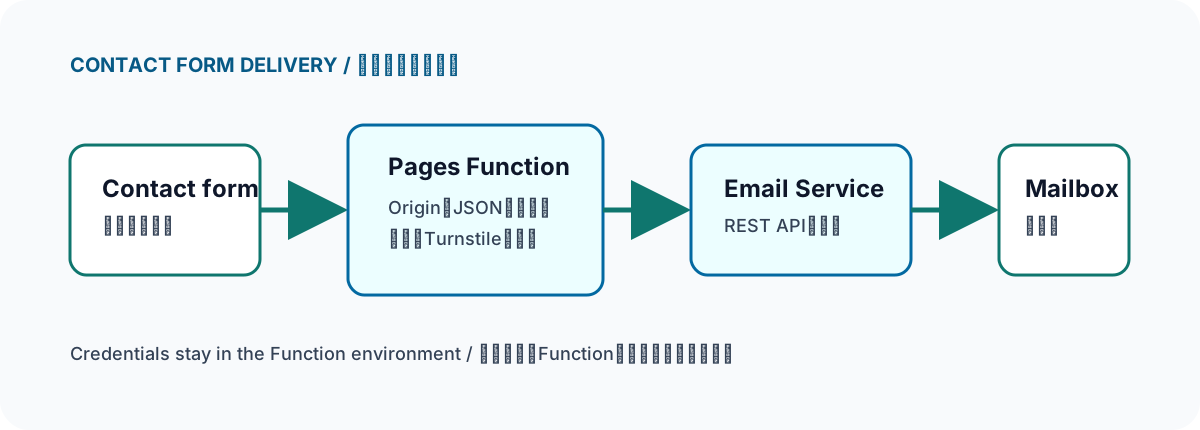
The browser does not hold sending API credentials. The Pages Function separates input handling, verification, and delivery.
Requests rejected first by the Function
onRequestPost checks that the request has the same origin as its URL and that its Content-Type is JSON. The body is checked not only with Content-Length but while its stream is read, so an oversized body is not accepted when the header is missing. Non-JSON bodies, arrays, and requests missing required values are converted to failure responses before email delivery.
if (request.headers.get('Origin') !== expectedOrigin) return fail(403);
if (contentType !== 'application/json') return fail(415);
const payload = await readJsonBody(request);
if (!payload) return fail(400);
Names, subjects, messages, and tokens have length limits, and the Function also checks email format and the message’s minimum length. Browser-side required attributes do not stop direct API requests, so the server needs the same boundary. When the hidden honeypot has a value, the Function returns a success-shaped response and stops, without revealing whether delivery occurred.
Responsibilities of the sending path
Missing required environment variables return 503. Turnstile communication or verification failures return 403 or 502, and a sending API response that does not indicate success also returns 502. Sender, recipient, and API-token values are never included in the response. The input email address is used as Reply-To, allowing the operator to handle the reply path separately.
This implementation uses the Cloudflare Email Service REST API; it does not assume another sending platform. Variable names and their intended exposure are documented in docs/contact-form-setup.md, while actual values are kept out of Git, source files, browsers, and logs.
Common mistakes and how to check them
Do not decide delivery succeeded from the screen alone. Send from the production form and check both receipt and Reply-To. On failure, classify the response with HTTP status while keeping secrets and internal errors out of the user-facing response. Leaving methods other than POST unimplemented also limits unintended use.
The Function’s JSON response is limited to ok; it does not reveal which validation failed. The browser provides input assistance, while the server enforces the boundary. Keeping those responsibilities separate allows UI changes and sending-permission management to change independently.
The email body is assembled from submitted values, but the external API response body is not passed to the user. The Function response and the form’s messages remain separate so an input error is not presented as the same condition as a temporary sending-service failure.
Official documentation and related article
- Cloudflare docs: Pages Functions — Reference for Pages Functions.
- Cloudflare docs: Email Sending — Reference for Cloudflare’s email-sending capability.
- Forwarding custom-domain email to an existing mailbox with Cloudflare Email Routing — Explains why inbound forwarding and form delivery are treated as separate paths.