- Author
- app-hacks
- Published
- Updated
- Reviewed
SEO / i18n / Astro
canonical, hreflang, and x-default for Multilingual Sites
Set self-referencing canonicals, language URLs, and x-default consistently to prevent multilingual URL and reference mistakes.
canonical, hreflang, and x-default for Multilingual Sites
Do not treat a canonical and hreflang as the same instruction. A canonical identifies the preferred URL for the current page. hreflang identifies an equivalent page available in another language. Pointing a Japanese page’s canonical at its English version mixes those two roles.
This article uses a static site where Japanese is the default URL and English is under /en/.
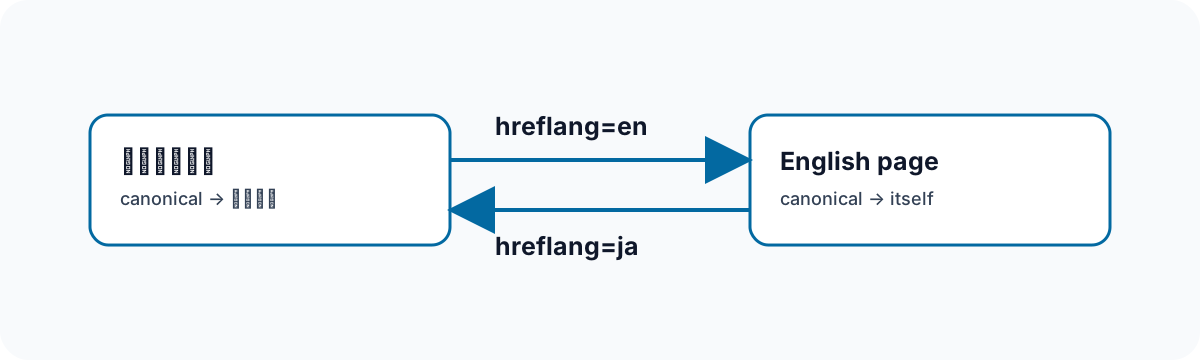
Make Every Canonical Self-Referencing
For a Japanese article at https://app-hacks.net/blog/example/ and its English version at https://app-hacks.net/en/blog/example/, each page identifies itself.
<!-- Japanese page -->
<link rel="canonical" href="https://app-hacks.net/blog/example/">

<!-- English page -->
<link rel="canonical" href="https://app-hacks.net/en/blog/example/">
The pages serve different language audiences even when their content corresponds. Keep protocol, hostname, and trailing-slash conventions consistent with the site’s chosen URL format.
Connect Existing Language Versions with hreflang
When both versions exist, emit ja, en, and x-default as one set.
<link rel="alternate" hreflang="ja" href="https://app-hacks.net/blog/example/">
<link rel="alternate" hreflang="en" href="https://app-hacks.net/en/blog/example/">
<link rel="alternate" hreflang="x-default" href="https://app-hacks.net/blog/example/">
x-default identifies the default URL for people who do not match a specific language or region. In this structure it is the Japanese URL. It does not redirect a browser; offer language links separately so the visitor controls navigation.
Centralize URL Construction
Building URLs differently in article, index, and static-page templates creates small inconsistencies, such as a missing slash or a development host in a published tag. Put canonical and alternate-link output in one shared component. A page then supplies its canonical URL, language, and known alternate path.
<SEOHead
  canonical={canonicalUrl}
  lang="ja"
  alternatePath={`/en/blog/${post.id}/`}
/>
The English page passes lang="en" and its Japanese alternate. Never emit an inferred alternate for a translation that does not exist. A nonexistent URL gives readers and crawlers a false relationship.
Verify the Built HTML in Both Languages
Source code alone cannot prove the URLs that were generated. After npm run build, inspect one Japanese/English pair.
rg -n 'canonical|hreflang' \
  dist/blog/example/index.html \
  dist/en/blog/example/index.html
Check that every canonical is the page’s own HTTPS URL, both documents name the same two alternate URLs, the x-default matches the site policy, and no localhost, preview, or untranslated URL appears. Repeat this check when a page type or language is added. Keeping self-canonical URLs separate from language relationships makes the metadata easier to maintain.